1. Overview
Manually copying data from CRMs into billing systems is tedious and error-prone. Finrite's connector eliminates this friction by creating Stripe subscriptions and related objects automatically when deals close in HubSpot — out of the box, with no code required.
Key Features
- Zero-code setup — Connects Stripe and HubSpot out of the box for standard flows. No engineering resources required.
- Testing environment — Test the connector with deal-by-deal approval. When ready, switch to automatic sync with production keys.
- Streamlined records — Ensures existing customers, products, and prices in Stripe are not duplicated. Automatically creates new objects when no prior records are found.
- Full configuration — Toggle global settings such as invoice behavior and source object. Standard flows require zero-touch setup; custom configurations are supported by the Finrite team.
2. Supported Billing Models
Subscription Creation Flows
- Flat subscription pricing
- Tiered pricing
- One-off prices added to subscriptions
- Prorations support
- One-off invoices
Usage-Based Billing
- Pay as you go usage
- Credit and overage based usage models
Planned Roadmap
- Trial periods on subscriptions
- Mid-cycle edits and amendments to existing subscriptions
- Usage-based billing: reporting live usage
- Subscription schedules
3. Standard Subscriptions
This section describes how to set up the Finrite connector for standard flows — turning closed-won deals into Stripe subscriptions with flat, tiered, and one-off prices. Existing prices and customers are searched, and new ones created if no pre-existing records are found.
A. Setup Process
Connect Your Accounts
Reach out to Finrite to enable your organization for connector access. Once enabled, log into the Finrite dashboard and configure your API keys for both HubSpot and Stripe, in both test and production modes, via the Settings page.
For Stripe: Create restricted keys with permission to read and write core billing objects.
For HubSpot: Create a private HubSpot app with the following read/write scopes:
- OAuth
- Products
- Companies
- Contacts
- Deals
- Line Items
- Quotes
Note: Enter your keys and private tokens into Finrite settings. Use Stripe test keys to test your integration. Only use production keys — in a separate account — when your setup is verified and accurate.
Product and Pricing Syncing
Tell Finrite how your HubSpot products correspond to your Stripe products and prices. This avoids duplicate records if you have existing Stripe products. Navigate to Product Mappings in the left sidebar.
- Map manually: Click
+ Add Mappingto enter a HubSpot Product ID and its corresponding Stripe Price ID. - Upload CSV: For bulk mapping, click
Upload CSVto import all your product-to-price mappings at once.
When complete, Finrite uses the corresponding Stripe Product for a given HubSpot Product and verifies that price, currency, and interval match. If price details differ, a new Stripe Price is created under the same Stripe Product with the updated values.
If a deal contains a line item without any HubSpot Product mapping, Finrite will automatically create a new product and price in Stripe and save this mapping for future reference. These mappings appear in the Line Item Overrides section.
Note: Since HubSpot Products contain pricing information, they map to the Stripe Price object, not the Stripe Product object.
Customer Mapping
Finrite automatically handles existing customer lookup and mapping when deals are synced. Customer lookup is determined in one of two ways:
- Specific contact lookup: Create a custom HubSpot Property called
billing_contactand set it totrueto look up pre-existing records for a specific contact only. - Default behavior: If no
billing_contacttag is provided, Finrite looks up all HubSpot contacts associated with the deal and/or quote and matches on email address.
Optional Service Start Date, Billing Cycle Anchor, and Service End Date
Stripe subscriptions use multiple fields to determine when subscriptions start, end, and are billed. Create HubSpot Properties that map to these dates. If not mapped, Stripe uses the subscription creation date by default.
- Backdate Start Date: The date from when subscription service began, if in the past. Leave blank if billing for today or a future date.
- Billing Cycle Anchor: The repeating billing date (e.g., 1st of month). Enter the first cycle anchor date if in the future, or leave blank for today.
- Cancel At: The date when a subscription is cancelled. Auto-renews indefinitely if not specified.
B. Sync Process
Finrite handles syncing HubSpot data to Stripe automatically, with a manual option available:
- Automatic mode — Creates Stripe Subscriptions (and corresponding objects like new customers) any time a deal reaches closed-won. Syncs take place on a configurable schedule — if a deal status is reverted before syncing, no subscription is created.
- Manual mode — Requires the user to select which deals should be synced. Ideal for initial setup and testing. A
Sync Alloption syncs all unsynced deals at once.
The sync mode is controlled by a toggle on the Deals page. All synced deals are visible in this view, including a tag indicating whether they were synced manually or automatically.
Key Sync Properties
- Closed-won as trigger: Only deals in the closed-won state are eligible for syncing, whether automatic or manual.
- Future-facing in automatic mode: Automatic sync only applies to deals that reach closed-won after automatic syncing is enabled. Past deals are visible in deal view and can be synced manually.
- Unidirectional: Currently, the connector syncs HubSpot data to Stripe Billing for billing automation. Bidirectional syncing (Stripe payment and renewal data back to HubSpot) is planned for a future release.
- Metadata tagging: Finrite adds metadata to Stripe objects (customer, subscriptions, prices) to indicate they were created by the connector.
C. Global Configurations
Finrite provides global settings that apply to all subscriptions created by the connector:
- HubSpot source object: Configure whether line items (product, price, quantity) are read from the Quotes object or the Deal object.
- Stripe collection method: Choose between Charge Automatically (assumes existing payment method on file; invoice is due immediately) or Send Invoice (invoice is sent to collect payment, due in the future).
- Proration mode: Determine whether to bill for incomplete billing periods or only for full, upcoming billing periods.
- Sync schedule: Automatic mode runs a midnight UTC sync by default — customize in settings.
D. Error and Retry Handling
On occasion, a sync may fail due to system or user error (for example, a mapped product that was subsequently archived). In these cases:
- Failed syncs are clearly marked with the corresponding error message.
- Failed syncs are not automatically retried but can be manually reattempted.
- Email notifications for failed syncs can be configured in settings.
4. Usage-Based Billing
Finrite supports usage-based billing models in Stripe, where customers are charged based on consumption rather than fixed recurring amounts. This section covers how to configure metered billing flows from HubSpot to Stripe.
A. Identify Usage-Based Products and Models
Note: Usage-based billing requires you to first set up usage meteres in Stripe. Ensure you've completed this step first (via the Stripe dashboard or API)
To sync usage-based deals to Stripe Billing, you will have to indicate to Finrite which products are usage based, and where to lookup their usage:
- Tag Usage Based Products: Create a custom HubSpot property for relevant HubSpot Products, called is_metered and set this to "Yes".
- Map to Usage Model: Finrite supports two types of billing models via Stripe's Billing system:
- Pay-as-you-go: Usage is billed at a fixed rate per unit of usage. Customers pay at the end of the billing cycle according to usage consumed. Create a customer HubSpot property called finrite_price_per_credit on the HubSpot Product equal to the price per usage unit.
- Credits with overages: In this model, the customer is given a base tier of free usage and is charged for overages at a fixed rate per unit of usage. You can define these values by setting finrite_included_credits and finrite_overage_rate as custom HubSpot Product properties.
Finrite can now determine which products have Usage-Based Billing and their billing model. Specify how to associate usage with products in the next step.
B. Map to Stripe Usage Meters
On Finrite's Manual Mappings page, associate each HubSpot product ID with the corresponding Stripe Usage Meter. This ensures that each Usage-Based product is mapped to the right meter to measure usage. If this value is missing, Finrite will surface an error upon syncing.
C. Report Usage
By the following the preceeding steps, Finrite is able to create Stripe subscriptions with the appropriate usage meters linked to product. However, you will still need to report usage to Stripe to track how much of a product your customers have consumed:
- Direct integration: Integrate your product data with Stripe's metering system. This will require engineering and integration effort on your side.
- BetaFinrite Usage Reporter: Upload CSVs of product usage data into our dashboard. Data will have to be uploaded every billing period. However, no integration effort will be required.
5. Field Mapping
The following tables detail the complete field mapping between HubSpot source objects and the corresponding Stripe objects created by the connector.
Customer Fields
| Stripe Field | HubSpot Source | Notes |
|---|---|---|
| customer.email | contact.email Required |
Match by email; create new if not found |
| customer.name | contact.firstname + contact.lastname | Combined name fields |
| customer.phone | contact.phone | |
| customer.address.line1 | contact.address | |
| customer.address.line2 | contact.address2 | |
| customer.address.city | contact.city | |
| customer.address.state | contact.state | |
| customer.address.postal_code | contact.zip | |
| customer.address.country | contact.country_code | |
| customer.tax_id.type | company.tax_id_type Custom |
Custom company field |
| customer.tax_id.value | company.tax_id_value Custom |
Custom company field |
Product Fields
| Stripe Field | HubSpot Source | Notes |
|---|---|---|
| product.name | product.name | Create new product if not mapped |
| product.description | product.description | |
| product.metadata.hubspot_product_id | product.id | Metadata reference |
Price Fields
| Stripe Field | HubSpot Source | Notes |
|---|---|---|
| price.unit_amount | lineitem.price Required |
Look up if currency + interval + amount match; create new if not found |
| price.recurring.interval | product.recurringbillingfrequency Required |
Fallback to lineitem if not on product |
| price.currency | deal.deal_currency_code | |
| price.metadata.hubspot_line_item_id | lineitem.id | Metadata reference |
| price.metadata.hubspot_product_id | product.id | Metadata reference |
| price.metadata.hubspot_deal_id | deal.deal_id | Metadata reference |
| price.metadata.is_override | — | Set when line item overrides product price |
Subscription Fields
| Stripe Field | HubSpot Source | Notes |
|---|---|---|
| subscription.items[].quantity | lineitem.quantity Required |
|
| subscription.collection_method | — | From Finrite global settings |
| subscription.proration | — | From Finrite global settings |
| subscription.days_until_due | — | From Finrite global settings |
| subscription.billing_cycle_anchor | deal.billing_cycle_anchor Custom |
Custom HubSpot property |
| subscription.backdate_start_date | deal.backdate_start_date Custom |
Custom HubSpot property |
| subscription.metadata.hubspot_deal_id | deal.deal_id Required |
|
| subscription.metadata.hubspot_dealname | deal.dealname | |
| subscription.metadata.hubspot_dealstage | deal.dealstage Required |
|
| subscription.metadata.source | — | Always "hubspot-stripe-sync" |
Usage Based-Billing Fields
| Stripe Field | HubSpot Source | Notes |
|---|---|---|
| - | product.is_metered Custom |
Determines if usage-based billing mapping applies |
| price.recurring.meter | — | From Finrite mapping page |
| price.unit_amount | product.finrite_price_per_credit Custom |
Price for pay-as-you-go, usage products |
| price.tiers[0].up_to | product.finrite_included_credits Custom |
Free usage tier for credit + overage, usage products |
| price.tiers[1].unit_amount | product.finrite_overage_rate Custom |
Overage rate for credit + overage, usage products |
6. Data Flows
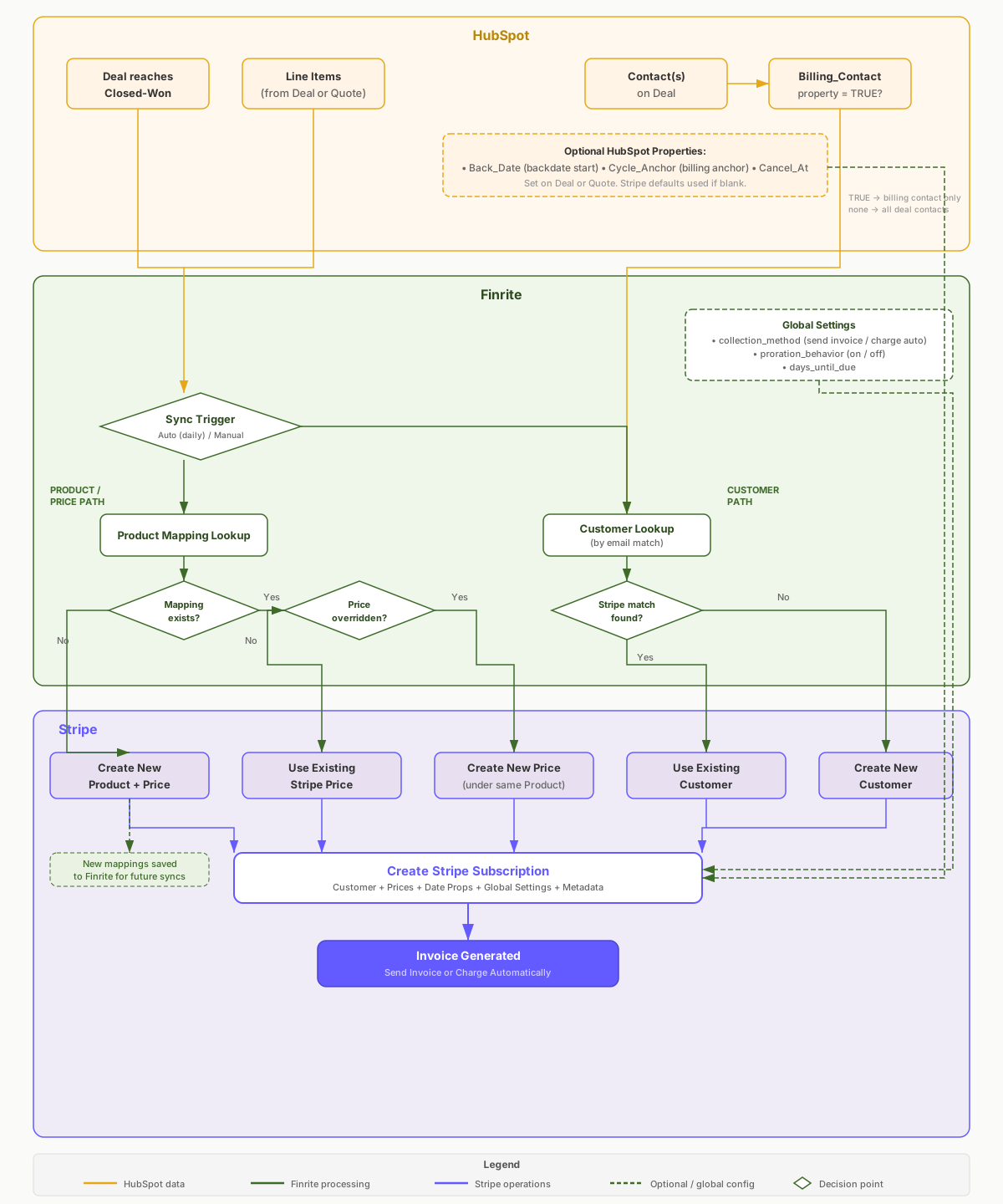
The following diagram illustrates the end-to-end sync architecture from HubSpot to Stripe.
7. Beyond Standard Flows
This guide covers out-of-the-box functionality for standard subscription flows. Finrite's connector platform supports additional customizations, including:
- Override standard behavior (e.g., sync deals before closed-won)
- Customer-segment specific behaviors (e.g., use charge automatically for select customers only)
- Additional objects or parameters (e.g., sync discount and tax information)
- Extended workflows (e.g., switch from send_invoice to charge_automatically when a card is collected)
Contact the Finrite team at contact@finrite.co to set up custom connector configurations. No engineering resources are required on your end, and our connector platform enables onboarding in under two weeks in most cases.