If you already use Stripe for payments, sending invoices through the same account can feel like a natural next step. Stripe Invoicing lets you create invoices, accept online payments, automate reminders, and track payment status from the Stripe Dashboard.
Stripe Invoicing Plus adds more advanced invoicing features, including Stripe Quotes for one-time invoices.
It occupies a different category from tools such as Square Invoices, Zoho Invoice, QuickBooks Online, or Wave Pro. Some of those products lean further into small business accounting, while Stripe stays closely tied to payments and billing.
The distinction becomes even more important when quoting happens before payment collection. Stripe can handle straightforward estimates, but sales teams dealing with negotiated pricing or CRM-driven deals may eventually need a fuller CPQ process.
So, what do you actually get with Stripe Invoicing Plus, and how far can its native quoting capabilities take you?
TL;DR
Stripe Invoicing Plus is Stripe’s higher-tier invoicing option, adding features such as Stripe Quotes, Smart Retries, and automatic reconciliation for businesses that need more than basic invoice creation.
Stripe Quotes lacks essential features such as signature capture, CRM-native quoting, and advanced approval workflows. It cannot fully handle Stripe Billing's more advanced configurations, including subscription schedules and phases, making it less suitable for businesses with complex pricing models.
Invoicing Plus costs 0.5% per paid one-time invoice, while Starter costs 0.4%, with Stripe Payments fees charged separately.
Businesses may need a fuller CPQ workflow when deals involve negotiated pricing, complex billing structures, subscription changes, or growing amounts of manual work.
Finrite adds CRM-driven quoting, payment collection during signing, complex pricing support, and automated Stripe Billing setup while letting you keep Stripe as your billing infrastructure.
What Is Stripe Invoicing Plus?
Stripe Invoicing Plus is the higher-tier version of Stripe Invoicing for businesses that want additional invoicing and accounts receivable features.
Stripe currently offers Starter at 0.4% per paid invoice and Plus at 0.5% per paid invoice for one-time invoices. Stripe Payments processing fees still apply separately.
Plus includes the capabilities found in the Starter plan while adding features such as Stripe Quotes, Smart Retries, and automatic reconciliation.
Recurring invoices work a little differently. Invoices generated from subscriptions fall under Stripe Billing, which has separate pricing from Stripe Invoicing's one-time invoice fees.
Stripe charges based on successful invoice payments. Invoicing Plus has no standard monthly fee, but it’s not free invoicing software: transaction fees still affect your overall cost.
For online businesses already using Stripe Payments, Plus can keep invoice creation and payment collection closely connected while adding a basic pre-sale quoting workflow.
What Features Does Stripe Invoicing Plus Offer?
Stripe Invoicing Plus combines Stripe's core invoicing tool with additional accounts receivable (AR) features. You can create and send professional invoices while keeping payment activity tied to your Stripe account.
Key features include:
Stripe Quotes: Create estimates before starting a one-time invoice and convert accepted quotes into invoices. However, Stripe Quotes does not support signature capture, so businesses that require signed agreements need a separate solution.
Invoice customization: Add branding, customer details, line items, discounts, tax information, and other invoice content.
Hosted invoice pages: Give clients an online page where they can review an invoice and pay.
Payment options: Accept supported methods such as cards or an ACH bank transfer, depending on your location and account configuration.
Payment links: Give customers an online route for completing payment where supported by your Stripe workflow.
Automatic reminders: Follow up on unpaid invoices with less manual work.
Automatic reconciliation: Match supported incoming payments with the correct invoice.
Reporting: Monitor invoices, payments, and accounts receivable activity from Stripe.
Stripe also offers a customer portal through Stripe Billing for subscription management, although it serves a different purpose from the invoicing features covered here.
Stripe Invoicing Plus vs. Stripe Invoicing Starter
Starter and Plus share the same basic Stripe Invoicing foundation.
Both let you create and send invoices, use hosted invoice pages, accept supported online payments, and manage invoice activity from your Stripe account. Plus adds capabilities aimed at businesses with more involved accounts receivable workflows, including Stripe Quotes.
Stripe prices Starter at 0.4% per paid one-time invoice and Plus at 0.5%. Stripe Payments fees remain separate.
For a freelancer sending occasional invoices or a small service business with a straightforward process, Starter may cover the core job. Plus becomes more relevant when you want estimates before invoicing or additional payment collection automation.
Neither option is a full accounting platform. Stripe does not provide the same combination of basic accounting, expense tracking, bank reconciliation, billable hours, or time tracking that you may find in accounting software.
If you need to track expenses alongside invoices, products such as QuickBooks Online or other light accounting tools may fit a broader financial workflow.
How Does Stripe Compare With Other Invoicing Software?
Stripe Invoicing Plus is easiest to evaluate when you know what you expect your invoicing tool to handle.
A free tool such as Zoho Invoice can appeal to small businesses looking for features like custom templates and invoice management with no paid invoicing plan. Other platforms may bundle invoicing with accounting features or offer a free tier before moving customers onto paid plans.
Stripe takes a payments-first approach. The whole point is keeping invoicing close to Stripe Payments rather than building a full accounting suite around it.
That can suit online businesses already running transactions through Stripe. A company searching for unlimited invoices, mobile apps, time tracking, or full accounting capabilities may place different products higher on its shortlist.
Your choice comes down to the workflow you need the software to support.
Does Stripe Invoicing Plus Include Quoting?
Yes. Stripe Invoicing Plus includes Stripe Quotes.
Quotes let you prepare pricing for a customer before creating the associated invoice. You can create the quote, present it to the customer, and convert accepted pricing into an invoice.
For straightforward deals, the workflow is convenient. You can prepare pricing and keep the eventual payment activity inside Stripe rather than manually creating a separate invoice afterward.
Stripe Quotes is still relatively lightweight compared with dedicated CPQ software. The native feature is primarily designed to connect a pricing estimate with Stripe invoicing or billing.
It does not provide the deeper sales controls you would normally associate with a mature CPQ product, such as CRM-native quoting, advanced approval workflows, or extensive commercial configuration.
Most tools built primarily for invoicing have a similar boundary. Creating an estimate and invoice is different from managing a complex B2B quoting process.
For simpler sales, Stripe's built-in option may be enough. More involved deals can expose the limits fairly quickly.
When Do You Need More Than Stripe’s Native Quoting?
Native Stripe quoting can work well when pricing is simple, and the person creating the quote already works directly in Stripe. A dedicated CPQ layer becomes more relevant as your sales process grows more complicated.
Common signs include:
Your CRM drives the sales and billing process: Most businesses manage their sales process from the CRM, so reps need quotes connected directly to existing deal and customer information. Creating quotes separately in Stripe requires additional data entry and can complicate the handoff to billing.
Pricing changes from deal to deal: Negotiated terms or customer-specific pricing call for stronger controls.
Approvals are required: Larger discounts or unusual commercial terms may need review before a quote reaches the client.
Billing structures are more advanced: Models such as usage-based billing or ramp schedules need more configuration than a simple quote.
Existing subscriptions change: Renewals and upsells may need to modify an active Stripe subscription.
You need signatures and contract management: Stripe Quotes does not support signature capture or comprehensive contract management, so businesses that need signed agreements and contract tracking require additional software.
Manual work keeps increasing: Quote volume can make repeated data entry harder to manage as the business grows.
Payment setup happens after signing: Extra steps between agreement and payment collection can slow down how quickly you get paid.
How Finrite Adds CPQ to Stripe
Finrite adds a CPQ layer for businesses that want to keep Stripe as their billing infrastructure. The main difference comes from where the quoting workflow begins.
Stripe Quotes primarily operates inside the Stripe environment. Finrite can build a quote using CRM deal data, manage the commercial agreement, collect signatures, and pass finalized billing information into Stripe.
Your sales team can keep working in the CRM while finance uses Stripe for recurring billing and payment collection.
Finrite also supports workflows that become more important once sales moves beyond straightforward invoice creation. Renewals and upsells can update existing Stripe subscriptions, while pricing structures agreed during the sales process can carry through into billing.
For small teams with very simple invoicing needs, the added functionality may be unnecessary. For companies selling negotiated contracts or recurring services, CPQ can connect the sales process with the billing setup that follows.
Create Quotes From Your CRM
A quote usually starts with information your sales team has already collected.
Customer details and products may already exist in your CRM. Asking a rep to open another system and create the same information again adds manual work before the buyer has even received a quote.
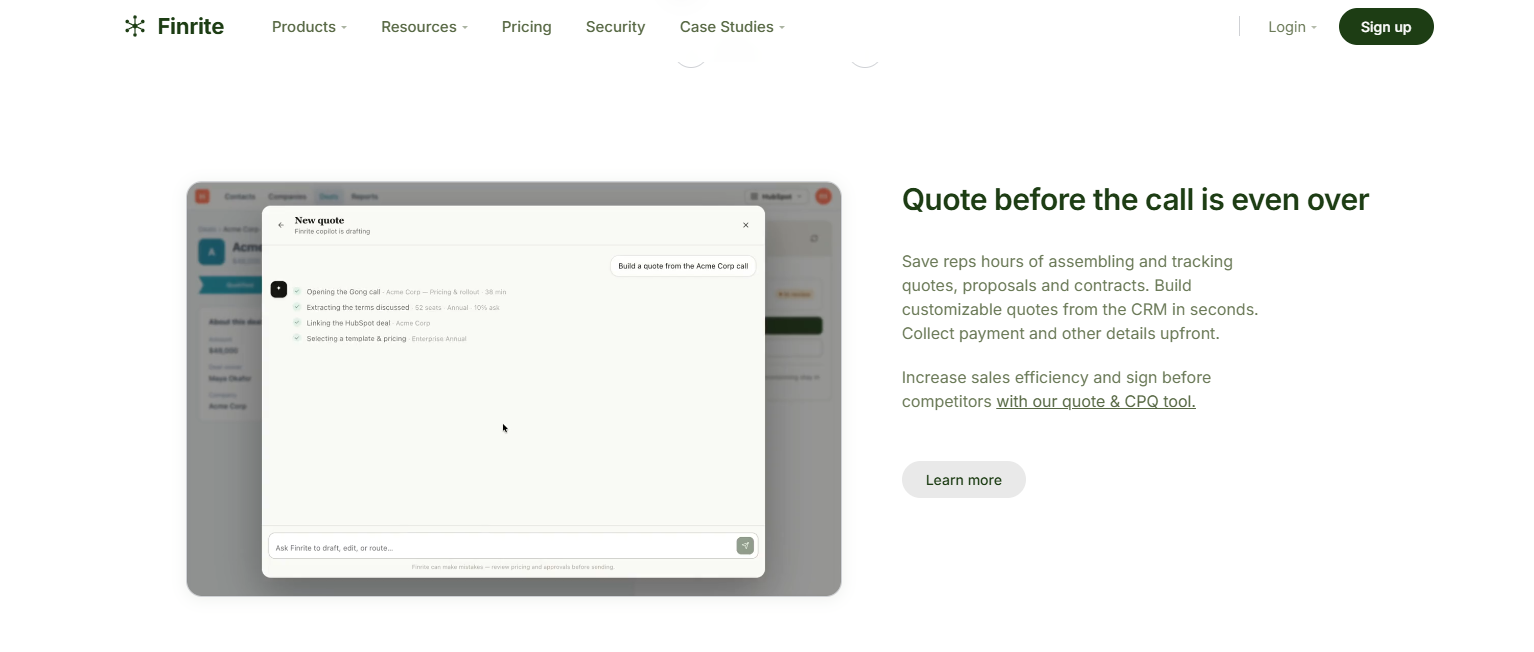
Finrite lets you build quotes from existing CRM deal data. For HubSpot users, the quote stays connected to the underlying sales record. Reps can work from the system they already use rather than treating Stripe as their primary sales interface.
The difference becomes more noticeable as quote volume grows. Re-entering information for a few customers may seem harmless, but the same process becomes harder to justify once sales teams create and send dozens or hundreds of quotes.
Keeping quote activity connected with CRM data also gives sales and finance a clearer view of what the customer agreed to.
Stripe can continue handling transactions and payments while the CRM remains the working environment for sales.
Support Complex Pricing and Billing Terms
Straightforward quotes are easy to represent in most invoicing tools. More complex contracts need extra structure before billing begins.
Finrite can support commercial terms such as:
Recurring pricing: Carry subscription terms from the quote into Stripe Billing.
Usage-based billing: Structure deals where the amount customers pay depends on consumption.
Ramp schedules: Set pricing to change at defined points during the contract.
Custom payment terms: Reflect negotiated billing arrangements rather than forcing every deal into the same schedule.
Proration and subscription changes: Handle changes to existing customer billing when the agreement evolves.
Finrite gives sales more control over how the deal is structured while finance receives billing information in a usable format. The distinction is important when invoices are the result of a negotiated sales process rather than a fixed price list.
Stripe still handles the billing infrastructure once the customer signs. Finrite handles the earlier commercial process that turns a custom deal into something Stripe can bill accurately.
Collect Payment Details During Quote Signing
A signed agreement doesn't always mean payment collection is ready to begin. Finrite can collect a card or another supported payment method during the quote signature process, including payment details needed for later Stripe billing.
That can help in a few ways:
Get paid faster: Customers can provide payment information while they review and sign the agreement.
Reduce follow-up: Sales or finance does not need to chase payment details after the deal closes.
Lower billing mistakes: Pricing terms and payment setup come through the same workflow.
Give clients fewer steps: Clients can sign and provide the information needed to pay in one process.
Depending on the setup, payment collection can later happen through methods such as card or bank transfer.
Stripe remains responsible for the underlying payment infrastructure. Finrite connects the quote and signature process with the Stripe account that will charge the customer, helping sales and finance move from agreement to payment collection with less manual work.
Turn Signed Quotes Into Stripe Billing
A signed agreement can still create work for finance. For instance, someone may need to read the contract, interpret the billing terms, and recreate the deal manually in Stripe.
Finrite automates much of that handoff.
Once a quote is signed, the agreed pricing and billing information can be used to create the corresponding setup in Stripe Billing. CRM products can also map to Stripe prices so the commercial agreement has a clearer path into billing.
Different structures can be supported depending on the deal, including recurring charges and other negotiated terms.
Reducing re-entry becomes increasingly useful as payment volume grows. Finance does not need to treat every new contract as a separate data-entry project. A cleaner handoff can also support healthier cash flow because fewer operational steps sit between signing and invoicing.
Manage Renewals, Upsells, and Amendments
Closing the initial deal is only one stage of the customer relationship. Existing customers may add products, increase usage, or renegotiate their commercial terms at renewal.
Finrite can create quotes for those changes and update the customer's existing Stripe subscription once the agreement is accepted.
An upsell does not have to start as a completely separate billing setup.
For example, a customer expanding its subscription can receive a revised quote tied to the existing relationship. Once signed, the relevant billing changes can flow into the Stripe subscription already managing the account.
Proration and other subscription adjustments can also form part of the billing update where appropriate.
The process keeps the new sales agreement tied closely to what the customer will actually pay.
Stripe's native quote functionality can be perfectly useful for an initial, uncomplicated transaction. CPQ becomes more useful when pricing continues to evolve after the first invoice and your team needs a repeatable process for managing those changes.
Keep Stripe for Billing, Add a Stronger Quoting Layer
Stripe Invoicing Plus makes sense for businesses that already use Stripe and want professional invoices, online payments, automated reminders, and straightforward quoting in the same ecosystem.
It is less suited to businesses searching for an invoicing product with unlimited invoices or an accounting platform with features such as time tracking and expense management. Those needs may point you toward a different category of software.
The bigger limitation appears when invoicing follows a complex sales process.
Stripe Quotes can cover basic estimates. Finrite adds CRM-driven quoting, negotiated pricing support, payment collection during signature, and automated Stripe Billing setup around it.
You keep Stripe as the system handling payments and recurring billing while giving your sales team a fuller CPQ workflow.
If Stripe already works well for your billing but its native quoting feels too limited, book a Finrite demo to see how Finrite can connect your CRM, quoting process, and Stripe account.
FAQs About Stripe Invoicing Plus
Does Stripe charge a fee for Invoicing?
Yes. Stripe currently charges a percentage of each paid one-time invoice, with Plus priced above Starter. Stripe Payments transaction fees also apply separately. There is no standard monthly fee under Stripe's normal usage-based Invoicing pricing, although larger businesses may qualify for custom pricing.
What are the downsides of using Stripe?
Stripe focuses heavily on payments and billing, so it may not cover everything a business expects from accounting or sales software. Features such as basic accounting, time tracking, expense tracking, and deeper CPQ workflows may require another platform. Usage-based and transaction fees can also increase as payment volume grows.
Is Stripe Invoicing Plus a monthly subscription?
No. Stripe Invoicing Plus normally uses usage-based pricing rather than a fixed monthly subscription. You pay a percentage of successful one-time invoice payments, with Stripe payment processing fees charged separately.
Is there a free version of Stripe Invoicing?
Stripe does not offer a completely free invoicing tier in the same sense as some dedicated free invoicing tools. You can create invoices without paying a fixed monthly subscription, but Stripe charges once eligible invoices are successfully paid. Businesses specifically looking for a free tier may want to compare other invoicing products.
Is Stripe Invoicing Plus good for small businesses?
It can be a good fit for a small business already using Stripe, particularly an online business or service company that wants invoicing and payments closely connected. Small service businesses that need billable-hours tracking, bookkeeping, mobile accounting features, or a broader financial platform may prefer software designed around those needs.
About Finrite
Finrite streamlines sales-led revenue workflows, without any billing engine change. Sales reps can send out proposals in seconds, and our HubSpot to Stripe Connector creates subscriptions, customers, and billing objects in moments.
Automate quote-to-cash. Keep your billing stack.
Give sales a faster way to quote and finance a reliable way to bill. Finrite connects your CRM, contracts, and billing to automate the work from proposal to subscription.
Read our guide on Salesforce CPQ vs CPQ+ and explore the differences between the two platforms. Discover why Finrite is a superior alternative to both.