Invoice Automation Software Guide for 2026 (+5 Best Tools)
Invoice Automation Software Guide for 2026 (+5 Best Tools)
By:
Kunal Mehta
,
October 9, 2026
How much time does your finance team spend moving invoice data between contracts, billing tools, and accounting systems?
Without good invoice automation software, even preparing accurate billing information can take longer than expected.
In fact, the American Productivity & Quality Center (APQC) reports a median of 2.4 days to generate complete and correct billing data across 7,562 companies. That is before you account for sending invoices, following up on payments, or reconciling everything afterward.
Luckily, invoice automation software can take a lot of that repetitive work off your team’s plate. It can help capture invoice data, generate recurring invoices, track payments, and keep records updated in your accounting system.
From there, the best setup will depend on how your billing process works today, where your data lives, how complex your pricing is, and what you actually want to automate.
TL;DR
Invoice automation software helps reduce manual work throughout invoice creation, processing, approvals, delivery, payment tracking, and reconciliation.
The right setup depends on where your invoice data comes from, how your billing works, and which parts of the workflow still rely on manual processing.
Useful features can include invoice capture, data extraction, approval routing, recurring invoice generation, payment tracking, and accounting synchronization.
Different platforms cover different parts of the lifecycle, from subscription billing and collections to contract-to-cash automation and accounts receivable workflows.
Finrite is built for teams using HubSpot and Stripe Billing that want to automate the handoff from closed deals and contracts into Stripe without replacing their existing billing setup.
What Is Invoice Automation Software?
Invoice automation software reduces the manual work involved in creating, processing, approving, sending, and tracking invoices. The category covers both outgoing customer invoices and incoming supplier invoices.
For accounts payable (AP), automated invoice processing software may capture invoice data from documents, match invoices with purchase orders, route approvals, and prepare approved invoices for vendor payments.
Common capabilities of these tools include:
Invoice capture: Collect invoice information from digital files, paper invoices, emails, or connected systems.
Data extraction: Pull important fields from invoices, contracts, or purchase orders without repetitive data entry.
Approval routing: Move invoices through configurable approval workflows based on business rules.
Invoice creation: Generate one-time, batch, or recurring invoices from billing data.
Payment tracking: Monitor invoice status and connect records with payment processing.
Accounting synchronization: Send invoice and payment information to an ERP or accounting system.
What Parts of the Invoice Lifecycle Can You Automate?
Invoice automation can begin before an invoice exists and continue until payment has been reconciled. Take a look at these steps and how you can automate them:
Invoice Creation
Invoice creation is one of the easiest places to remove repetitive administrative tasks.
For predictable billing, automation software can generate recurring invoices according to predefined schedules. More complicated businesses may need invoice amounts to reflect usage, contract terms, subscription changes, or custom pricing.
Automated invoice creation can pull information from:
CRM records
Signed contracts
Product catalogs
Subscription records
Usage data
Purchase orders
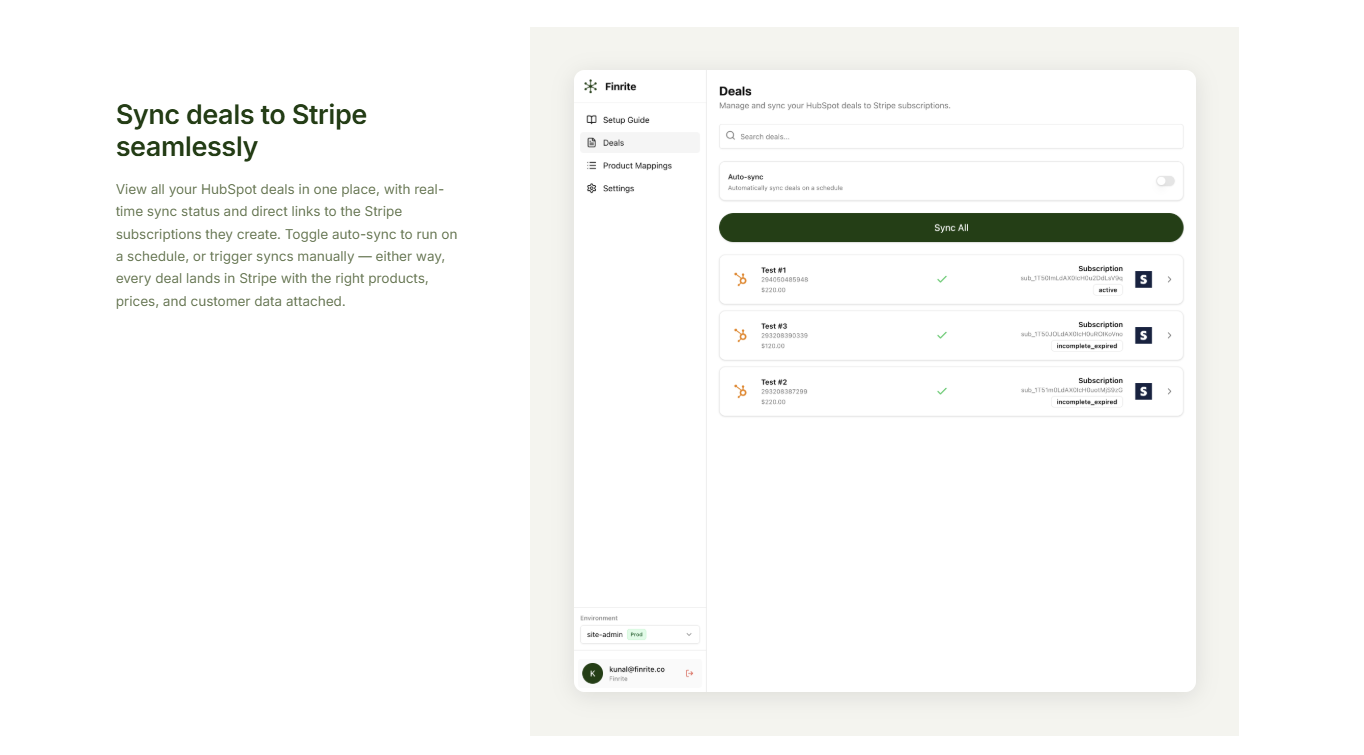
Finrite, for example, can map HubSpot products to Stripe prices and automatically create the corresponding Stripe subscription when a deal reaches closed-won.
Its integration supports recurring billing, one-time invoices, usage-based billing, ramp schedules, and custom payment terms.
Automating this handoff can reduce manual data entry before invoice processing starts. Cleaner billing information also lowers the chance of human error making its way into customer invoices.
Accurate invoices depend on accurate billing data. However, relevant information may live inside CRM records, signed contracts, order forms, usage systems, or other business applications. Someone often has to gather those details before billing can begin.
In contrast, invoice automation tools can collect data such as:
Customer information
Product and quantity details
Pricing
Billing frequency
Start dates
Payment terms
Discounts
Tax information
Structured fields can move through integrations. Unstructured documents usually require data extraction.
Finrite’s AI Contract product handles the latter. Users can upload contracts, purchase orders, or other unstructured documents, and its AI extracts customer information, pricing, and billing terms before creating Stripe billing objects.
Users can review results first and move toward automated processing once the workflow has been tested.
Invoice Approval Workflows
Not every invoice should move directly from creation to delivery.
Approval workflows can apply business rules based on factors such as invoice size, unusual payment terms, negotiated pricing, or missing information. Finance teams can then spend more time reviewing exceptions instead of routine invoices.
Some common workflow options include:
Automatic approval: Standard invoices can move ahead when they meet predefined rules.
Amount-based routing: Higher-value invoices can require an additional invoice approval step.
Exception handling: Missing or inconsistent invoice data can be routed to the appropriate person.
Contract review: Nonstandard billing terms can go to finance before an invoice is finalized.
Multi-stage approval: More complex organizations can build automated approval workflows with several reviewers.
Accounts payable automation uses similar logic for supplier invoices. AP automation software may route an incoming invoice according to purchase order matching, vendor information, or department.
When you implement it correctly, clear approval routing can shorten processing time while maintaining useful audit trails around who reviewed each invoice and when.
Invoice Delivery
Once an invoice is ready, automation can take over delivery. Recurring billing platforms can generate invoices on schedule and send them without requiring finance to prepare each one manually.
Stripe Billing, for example, supports invoicing alongside recurring subscriptions and provides automated invoicing capabilities within its billing platform.
Electronic invoicing becomes particularly useful for businesses dealing with:
Large invoice volumes
Recurring invoices
Different billing cycles
International invoices
Multiple currencies
Customer-specific payment terms
Some businesses also need batch invoicing when many customers follow the same billing cycle.
Automated delivery can reduce processing costs associated with preparing and sending invoices manually. It also makes invoice status easier to track because creation and delivery happen through a documented workflow.
Paper invoices may still appear in certain businesses, but scanning invoices and manually distributing them usually adds extra processing steps compared with electronic invoicing.
Payment Collection
Invoice automation software can connect invoice records with payment processing so your team can follow what happens after an invoice is sent.
Automated workflows may:
Charge stored payment methods
Send payment links
Update payment status
Flag payment failures
Trigger follow-up activity
Reconcile successful payments
Connecting payment activity back to invoice data gives finance teams a clearer view of paid invoices, outstanding balances, and payment delays.
Cleaner payment records can make collections easier to manage and give teams a more accurate picture of expected cash flow.
Security is worth considering too. Invoice automation solutions often handle sensitive financial data, customer records, and payment information, so access controls and the security standards of connected platforms should be part of your evaluation.
Invoice Tracking and Status Updates
Finance teams need visibility after an invoice leaves the billing system. Invoice processing software can track statuses such as open, paid, overdue, voided, or awaiting action, then pass those updates into other finance systems when needed.
Tracking can support several finance activities, such as:
Collections: See which invoices need follow-up and how long they have been outstanding.
Cash forecasting: Use current invoice status to build a clearer picture of expected incoming cash.
Customer service: Give teams faster access to billing status when customers have questions.
Renewal preparation: Review payment history and open balances before upcoming contract discussions.
Financial reporting: Keep invoice activity aligned with reporting and accounting records.
Pro tip: Reliable invoice data can also expose inefficient processes. If invoices regularly sit in one stage for several days, you can spot the bottleneck and adjust the workflow.
Reconciliation
Reconciliation connects payment activity with the correct invoice and accounting records.
Manual reconciliation often means finance teams have to compare data between payment platforms and an ERP or accounting system. Automated processing can handle straightforward matches, then route unusual cases for review.
Common exceptions include partial and duplicate payments, credits, refunds, incorrect amounts, and unmatched transactions.
A good invoice automation solution can reduce the amount of manual checking involved here. Paid invoices can be matched against incoming payments, while exceptions are flagged for someone to review.
That can lower labor costs tied to invoice processing and make exception handling easier to manage.
Cleaner reconciliation can also improve cash flow reporting. When payment records and invoice data stay aligned, finance teams get a more accurate view of what has been collected and what is still outstanding.
Failed Payment and Dunning Management
Late or failed payments can create a lot of repetitive follow-up work. Without automation, finance teams may need to check overdue invoices manually, send reminders, and decide when to escalate each account. Dunning automation helps apply those rules more consistently.
You might see workflows like:
Payment reminders: Send follow-ups when an invoice becomes overdue.
Failed-payment retries: Retry eligible payment methods based on preset rules.
Collections schedules: Trigger different actions as an invoice remains unpaid.
Escalation rules: Route higher-risk accounts for manual review.
Past-due status updates: Keep invoice records current as payment activity changes.
Automating those steps can reduce administrative tasks around collections and help teams respond to payment delays sooner.
You'll also see healthier cash flow. When finance teams follow up on overdue invoices consistently, they spend less time monitoring accounts manually and can focus on exceptions that need intervention.
5 Best Invoice Automation Software Solutions in 2026
Invoice automation tools approach the lifecycle from different angles. We've rounded up the five best ones:
1. Finrite
Finrite is designed for companies that already use HubSpot and Stripe Billing and want to automate the work between a completed sale and billing without replacing the systems they already rely on.
A closed-won HubSpot deal can create the matching Stripe subscription automatically, carrying over details such as products, quantities, customer information, and negotiated pricing.
Finrite can handle less structured sales data through its AI Contract product, which extracts customer details, pricing, and billing terms from documents before creating the relevant Stripe records.
A big difference is that Finrite works on top of Stripe Billing rather than asking you to move onto a separate billing system.
Many revenue and CPQ platforms come with their own billing layer, which can introduce migration work or leave you managing separate billing systems as your pricing model expands.
Finrite keeps Stripe as the billing foundation, which is ideal for companies combining sales-led contracts with product-led billing.
Your product-led subscriptions can continue running through Stripe, while Finrite helps bring negotiated deals and contract terms into the same billing environment.
Best Features
CRM-to-billing automation: Converts closed HubSpot deals into Stripe subscriptions and billing objects.
AI-powered data extraction: Pulls billing terms from contracts and purchase orders.
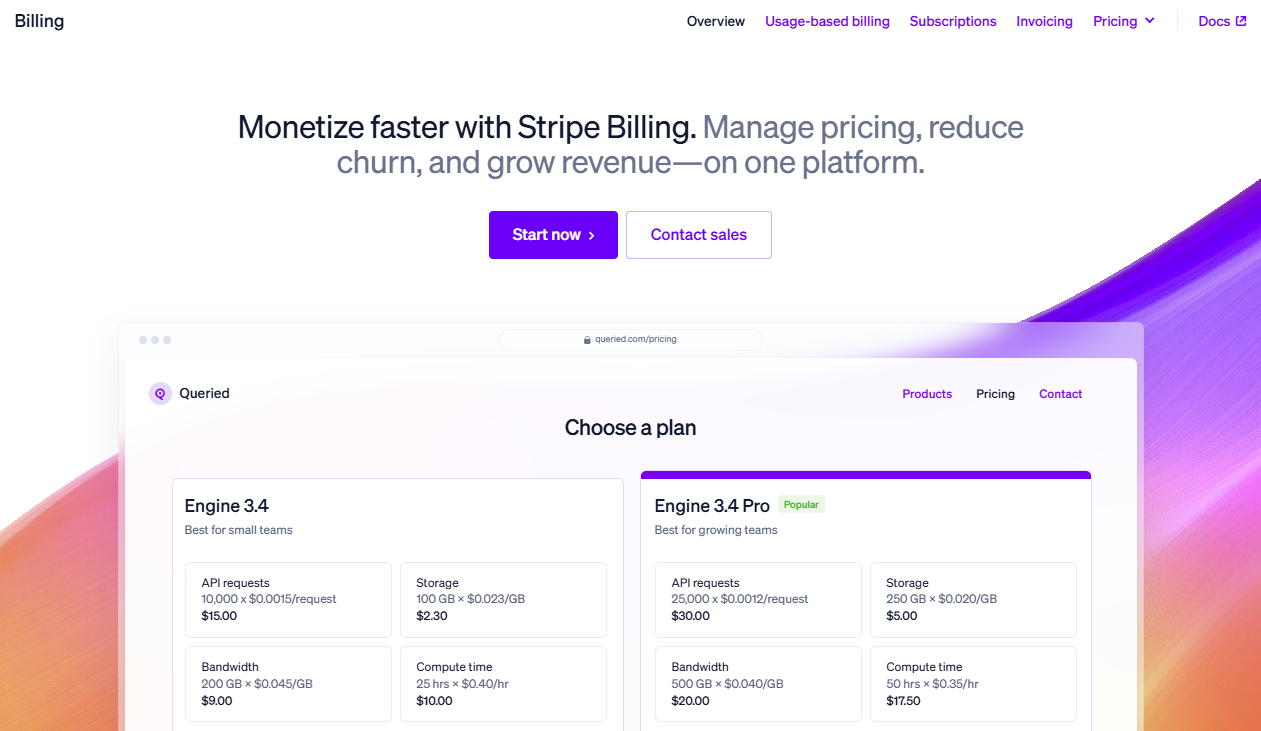
Stripe Billing combines subscription management, invoicing, and payment collection within Stripe.
Businesses can use it for recurring billing while also creating invoices, managing customer billing details, handling subscription changes, and automating payment recovery.
Source: Stripe.com
Its invoicing functionality includes payment reminders, Smart Retries, and automatic reconciliation for supported payment methods.
In general, Stripe Billing can fit companies whose invoice automation needs are closely tied to subscription or usage-based billing.
Best Features
Recurring invoice automation: Generates billing activity for subscriptions.
Flexible pricing: Supports a wide range of subscription and usage models.
Payment processing integration: Keeps invoices close to Stripe’s payment infrastructure.
Payment recovery: Provides reminders and machine-learning-powered retry functionality.
Invoice reconciliation: Supports automatic reconciliation for certain payment methods.
API access: Lets companies build custom automated invoice processing workflows around Stripe.
Sales-led companies may still need an additional layer to move CRM or contract information into Stripe accurately.
3. Tabs
Tabs approaches invoice automation as part of a larger contract-to-cash workflow.
The platform ingests customer contracts, extracts billing information, generates invoices, supports collections, handles revenue recognition, and synchronizes finance information with an ERP.
Source: G2
Contracts become structured billing data inside Tabs. Billing terms then define what should be invoiced and when. On the invoice date, Tabs can calculate amounts, incorporate usage, apply applicable adjustments, and create a draft invoice for review.
Best Features
Contract data extraction: Converts agreement terms into structured billing information.
Automated invoice generation: Creates draft invoices based on billing schedules.
Usage billing: Pulls usage events into relevant invoice calculations.
Collections workflows: Tracks receivables and supports dunning activity.
ERP synchronization: Sends invoicing information into connected finance systems.
Revenue recognition: Keeps billing terms connected with revenue schedules.
Exception handling: Allows finance teams to retain approval over situations requiring judgment.
4. Maxio
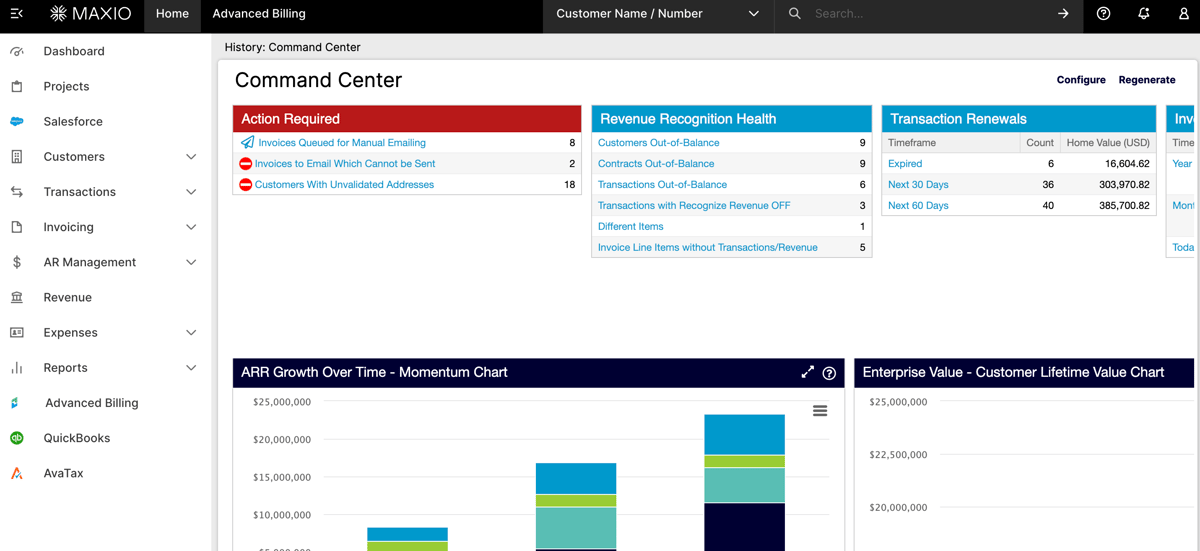
Maxio provides billing and invoicing tools built primarily around recurring revenue businesses.
Source: G2
Its Advanced Billing product includes invoice generation, configurable collection methods, invoice delivery settings, and dunning workflows.
Teams can determine how invoices are generated and delivered while setting rules for unpaid invoices entering collections.
Maxio also supports automated retries and dunning schedules when payment collection fails.
Best Features
Automated invoicing: Generates invoices from subscription and billing activity.
Invoice configuration: Controls numbering, delivery, metadata, and collection settings.
Its billing platform can generate recurring invoices on different cycles, consolidate subscription charges, handle prorations, and support different contract payment terms.
Source: Chargebee.com
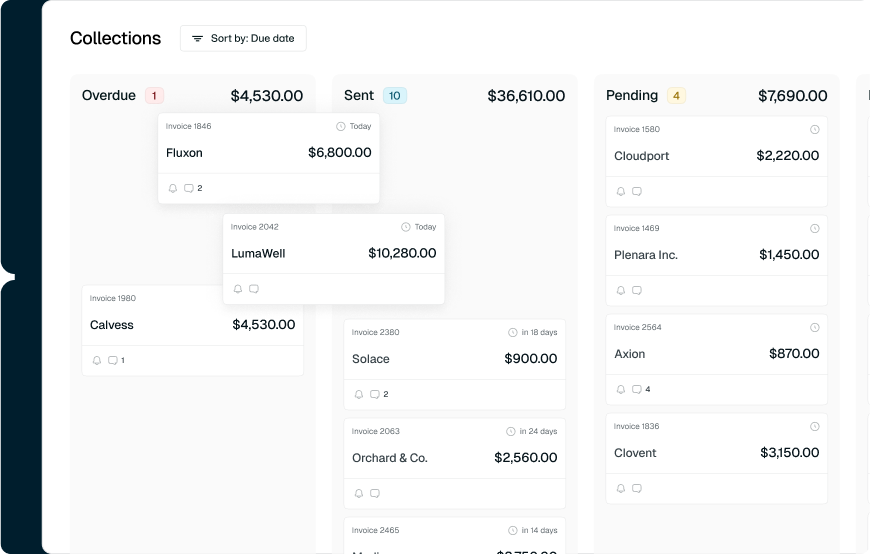
Additionally, Chargebee extends beyond invoice creation into receivables. Its current product supports automated reminders and dunning alongside payment reconciliation and collections workflows.
Best Features
Recurring invoices: Automates invoice creation according to billing cycles.
Consolidated invoicing: Combines eligible charges into a single customer invoice.
Subscription changes: Handles prorations and other billing adjustments.
Accounts receivable (AR) automation: Supports collections and overdue invoice workflows.
Payment recovery: Uses automated retries when invoices go unpaid.
Multiple currencies: Supports businesses operating with global billing needs.
Accounting connections: Sends invoice information into connected finance systems.
How Finrite Automates the Invoice Lifecycle
Finrite focuses on one of the most manual parts of invoicing, which, for many businesses, is getting sales and contract information into a form your billing system can readily use.
If you already use Stripe, you can automate those handoffs without replacing the billing setup your team already works with. Here's how Finrite works:
Turn Signed Deals Into Billing Data
A signed deal usually contains everything needed to start billing. The challenge is getting those terms into Stripe without asking someone on your team to re-enter them manually.
Finrite gives you a couple of ways to handle that depending on where the data lives.
If your deal information is already structured in HubSpot, Finrite can use those fields to create the relevant Stripe billing objects when the deal closes. Products can be mapped to Stripe prices, while deal-level overrides account for negotiated pricing.
When the billing terms only exist inside a document, Finrite AI Contract can extract details from contracts, purchase orders, or other unstructured documents.
Finrite pulls out information such as the customer, pricing, and billing terms, then checks existing Stripe records before creating anything new. You can review the results initially and move toward automatic processing once you are comfortable with the workflow.
Automate Stripe Billing Setup
Closing a deal is one step. Stripe still needs the right billing configuration before invoices can go out correctly.
Finrite can automate much of that setup directly from HubSpot. When an eligible deal reaches closed-won, the connector can create the matching Stripe subscription and carry over products, prices, quantities, and customer information.
It supports billing scenarios such as:
Recurring billing
Usage-based metering
Ramp schedules
Custom payment terms
Negotiated pricing
Finrite supports billing setups such as flat and tiered subscriptions, one-time prices and invoices, prorations, pay-as-you-go usage, and credit-plus-overage models.
The key difference is that Stripe stays underneath the workflow as your billing engine. You can automate the handoff from CRM to billing without introducing another billing platform simply to handle sales-led deals.
Handle Renewals, Upgrades, and Amendments
The first invoice is rarely the end of the customer relationship.
For instance, a customer might increase seats, move to another tier, renew their agreement, or change commercial terms later on. Those changes need to reach the existing Stripe billing setup without creating a disconnected record.
Finrite’s CPQ can carry renewals and upsells into a customer’s existing Stripe subscription. If a customer adds seats, moves to another tier, or changes commercial terms, those updates can flow into the current billing setup without forcing your team to recreate the subscription from scratch.
Keep HubSpot and Stripe Connected
CRM and billing records can drift apart surprisingly quickly when people copy information between systems by hand.
Finrite connects HubSpot deal data to Stripe Billing so the information needed for billing can move directly from your CRM. Product mappings associate HubSpot products with Stripe prices, while negotiated deal pricing can create the appropriate Stripe price when needed.
The Stripe app also brings HubSpot deal and contact context into the Stripe dashboard, which gives finance more commercial context while working in the billing system.
For your team, that can reduce problem areas like:
Re-entering deal information
Duplicate customer or product records
Incorrect pricing
Manual billing setup
Errors between signed terms and Stripe
Support Sales-Led and Product-Led Billing
If you already run product-led subscriptions through Stripe, those billing flows can stay where they are.
Finrite gives you a separate path for sales-led deals, taking structured HubSpot data, signed quotes, or contract terms and turning them into Stripe billing, which becomes useful as your pricing model expands.
For instance, a self-serve customer may enter through your existing product flow, while a larger account might negotiate custom pricing, ramps, usage terms, or payment conditions with sales.
Finrite can bring the sales-led agreement into the same Stripe environment instead of requiring your team to maintain a second billing platform for those customers.
You can keep Stripe as the billing foundation while adding more automation around the commercial workflows that happen before billing starts.
The easiest way to narrow the options down is to focus on where your current process creates the most manual work or extra invoice processing costs.
You should pay attention to:
Data capture: Can the system extract data from contracts, supplier invoices, purchase orders, or different invoice formats without constant re-entry?
Integration: Does it connect with your existing accounting software, billing platform, or ERP system without forcing a major rebuild?
Approval workflows: Can you automate the approval process and route exceptions based on your business rules?
Automation depth: Does it help with processing invoices only, or can it support more of the entire invoice lifecycle?
AP support: If accounts payable is a priority, look for automated invoice processing systems that fit your accounts payable process and workflows.
Cash flow impact: Can the platform help reduce payment delays, support early payment discounts, or improve visibility into collections?
Flexibility: Make sure it works with the systems you already use, including tools such as Microsoft Dynamics or Zoho Invoice if they are part of your stack.
Choose Invoice Automation That Fits How You Already Bill
Good invoice automation starts with finding the manual work that slows your billing process down.
For one business, the biggest problem may be invoice capture or approval routing. Another may struggle with collecting overdue balances. Sales-led SaaS companies can face a different issue entirely: getting contract terms from the CRM into the billing system correctly.
Its HubSpot and Stripe integration can turn closed deals into Stripe billing objects, while its AI Contract product extracts billing information from unstructured agreements.
Companies can reduce manual data entry and automate invoice preparation without replacing Stripe Billing.
The best invoice automation solution ultimately depends on where inefficient processes appear in your own invoice lifecycle. Map those points first, then choose automation software that removes meaningful work without creating another system your finance team has to manage.
Automated invoice processing uses software to handle tasks that would otherwise require manual processing. For accounts payable, the process may include invoice capture, optical character recognition, data extraction, purchase order matching, approval routing, and preparation for vendor payments. Customer-facing invoicing software may automate billing data collection, invoice generation, delivery, payment tracking, and reconciliation.
What is the best software to generate invoices?
The best software depends on how you bill customers. Stripe Billing can work well for businesses handling recurring subscriptions and payment collection through Stripe. Chargebee and Maxio combine invoicing with wider subscription management, while Tabs covers a broader contract-to-cash workflow. Finrite is relevant when invoices run through Stripe, but billing information first needs to move from HubSpot or contracts into Stripe accurately.
How can I automate invoicing?
Start by identifying the manual steps between a completed sale and payment. Look for repetitive data entry, invoice creation, approval routing, delivery, collections, and reconciliation. Invoice processing automation can then connect those steps through integrations or predefined business rules. Companies using HubSpot and Stripe, for example, can use Finrite to move closed deal information into Stripe automatically rather than rebuilding the billing setup manually.
What are the main benefits of invoice automation?
The benefits of automated invoice workflows can include reduced manual data entry, lower labor costs, faster processing time, and fewer errors. Automation can also make approval workflows more consistent and give finance teams clearer visibility into invoice status. Better payment tracking and collections automation may also help reduce payment delays and improve cash flow.
About Finrite
Finrite streamlines sales-led revenue workflows, without any billing engine change. Sales reps can send out proposals in seconds, and our HubSpot to Stripe Connector creates subscriptions, customers, and billing objects in moments.
Automate quote-to-cash. Keep your billing stack.
Give sales a faster way to quote and finance a reliable way to bill. Finrite connects your CRM, contracts, and billing to automate the work from proposal to subscription.